// intake
Client Intake and Confirmation
Every inquiry confirmed in seconds, routed to the right person.
$2.5M+ generated for clients and partners since January 2026.
Who it is for
Consultants, coaches, and agencies that take requests through their website. A slow reply loses the person who just asked.
What it does
New requests get checked against the work you actually take, confirmed instantly by SMS and email, and routed to the right person. Requests that are not a fit get a polite pass without wasting anyone's morning. Nobody waits in an inbox.
The run
- 1
Receive the request
From your website form
- 2
Evaluate the fit
A match, or a polite pass
- 3
Dispatch confirmation
SMS and email in seconds
- 4
Append and route
Assigned to the right person
What is Client Intake and Confirmation?
Client intake and confirmation is an automation that checks a new request against the work you take, confirms it instantly, and routes it to the right person, so intake starts the moment someone reaches out. New requests are checked for fit and scope, confirmed by email and text right away, and sent to the right person, while poor-fit requests get a polite reply instead of sitting in a queue. It is built for agencies, consultants, and coaches who take requests through their website or their DMs. The gap it closes is the silent stretch between a yes and the first human reply, where good leads cool off. A clean, structured intake is also the raw material every other automation depends on. Otomations builds it on your existing forms, calendar, and inbox.
Why this workflow matters
The notes in The Follow-Up that explain the leak this template plugs, and what it did for a business like yours.
The actual build
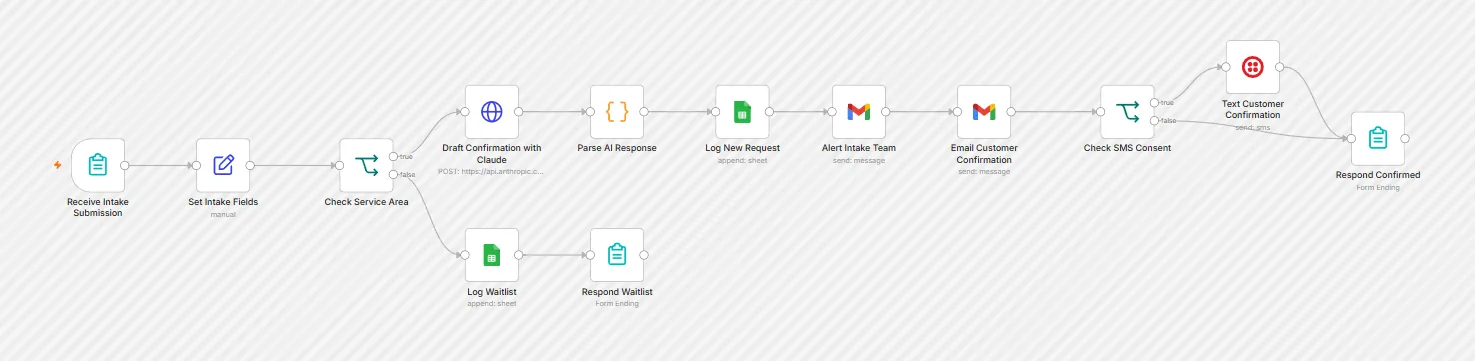
The production workflow on the n8n canvas. This is the system I tune to your tools and turn on.
Watch it run
Common questions
Can it turn away requests that are not a fit?
Yes. Requests outside the areas you serve get a polite, immediate decline, so your team never spends time on jobs you cannot take.
How long does it take to go live?
Most systems go live in two to four weeks. A speed-to-lead system can be live in seven days. The exact scope is set on the free Workflow Map call.
Also built for consultants, coaches, agencies
The full libraryScores and routes every form submission the moment it lands.
Sorts every reply and drafts the response before you open your inbox.
A chat agent grounded in your own docs, not generic AI answers.
One call. One map. You decide.
The Workflow Map call is free and takes 30 minutes. You leave with a one-page map of where your leads, proposals, or bookings fall through, and what I would build first. If I cannot find one thing burning your time, I will tell you that too.
$2.5M+ generated for clients and partners since January 2026.